
01What is Bitcask?
Bitcask is a high-performance key-value database released in 2008 by the team behind Riak at Basho Technologies. It was designed as the default storage engine for Riak, a distributed NoSQL database, and was built to solve a very specific problem: how do you get predictable, low-latency reads and writes out of spinning disks without sacrificing durability? Companies nowadays rarely use it directly because of the emergence of more feature-rich engines such as RocksDB, LevelDB, and various LSM-tree based systems. However, the architecture of Bitcask is elegant, minimal, and still widely referenced in database courses and system design interviews because it teaches foundational ideas in a very approachable way.
What makes Bitcask especially interesting is how few moving parts it has. There is no complex tree structure to balance, no multi-level compaction hierarchy, and no write-ahead log separate from the data itself - the data file *is* the log. This simplicity is precisely what gives Bitcask its predictable performance characteristics, and it is also why it remains a great teaching tool even decades after its introduction.
Notice that there is no update(key, value) operation. Updates are simply implemented as another put - Bitcask never modifies data in place. This "append-only, never overwrite" philosophy is the single most important idea to internalize before diving into the rest of the architecture.
02Problems that Bitcask solved
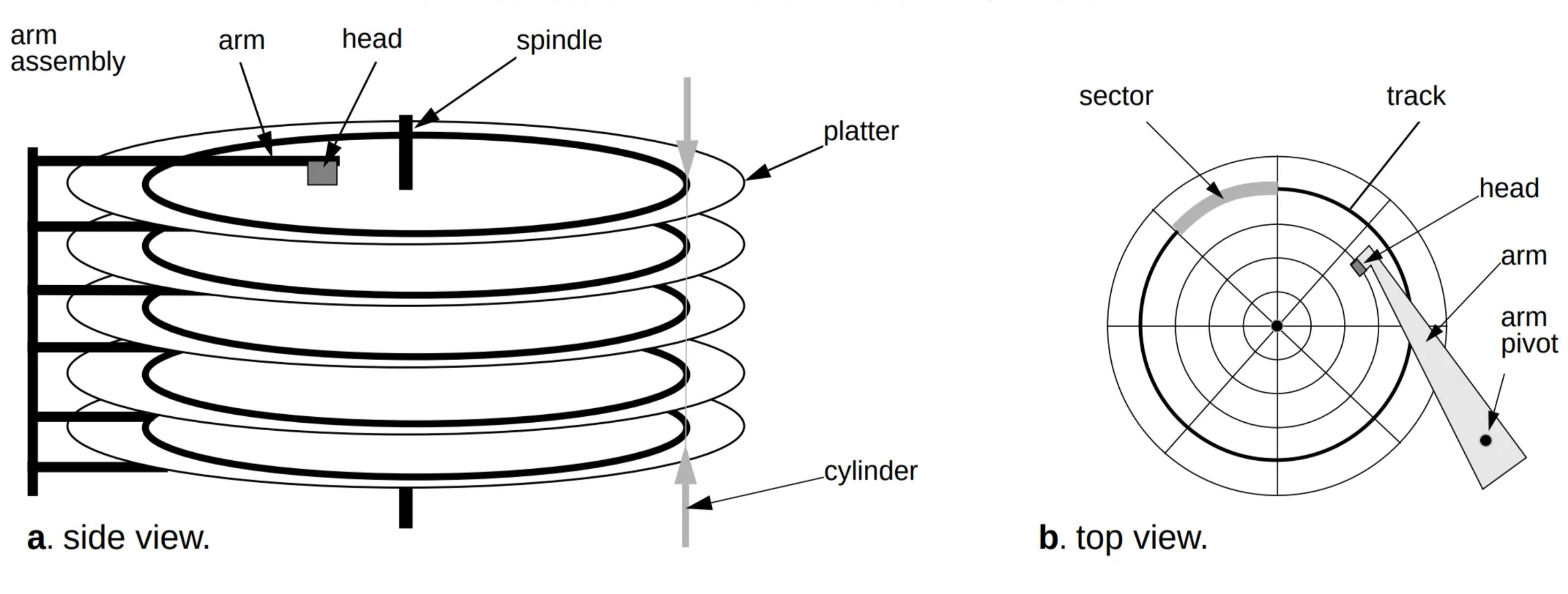
SSDs today perform random access very quickly, but with HDDs, performing these three operations is not easy. This is caused by the native mechanical design of HDDs, where every random access incurs a physical seek penalty that dwarfs the actual time spent transferring data.
2.1HDD
Both of these steps are mechanical and therefore orders of magnitude slower than anything happening electronically inside the drive. A typical seek can take several milliseconds, while reading or writing the actual bytes once the head is positioned takes only a fraction of that time. If an application performs many small, randomly located reads and writes, the disk spends most of its time seeking rather than transferring data - this is often referred to as being "seek-bound" rather than "throughput-bound."
2.2Random IO and Sequential IO
Because the design of HDDs requires the head to move and the disk to spin a lot if data is accessed randomly, the architecture of Bitcask offers users ways to access data sequentially, which helps increase performance significantly. In practice, sequential writes on an HDD can be an order of magnitude - sometimes two orders of magnitude - faster than random writes of the same total size, simply because the head barely has to move.
Bitcask's core insight is to convert every write into a sequential append, no matter where in the "logical" dataset that key belongs. Reads are handled separately through an in-memory index, so the only operation that ever needs to touch the disk for writing is a fast, sequential append - and even reads only need a single disk seek in the common case, rather than scanning through the entire dataset.
03Architecture
3.1Data files
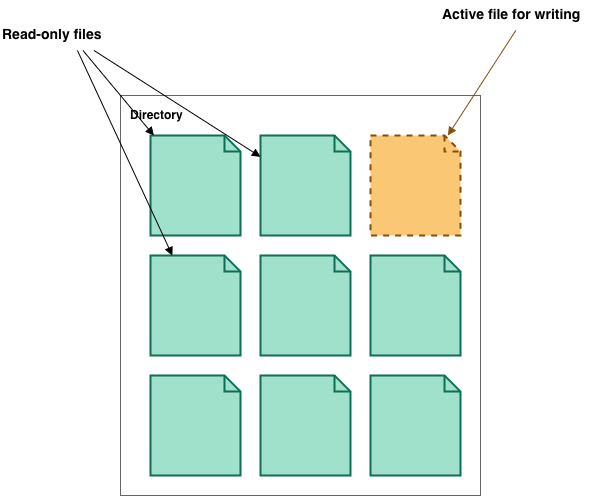
Data files store a large number of structured entries. There are two types of data files: stable files and active files. Both of them are append-only files, with only one active file at a time. All write operations are performed by appending to the end of the file, which avoids random access. This provides high performance with low latency; therefore, the write throughput of Bitcask is excellent.
When the active file size exceeds the threshold, it becomes a stable file, and a new active file will be created to continue processing. Stable files are, as the name implies, immutable - once a file stops being the active file, Bitcask never writes to it again. This immutability is extremely convenient operationally: it means stable files can be safely copied, streamed to replicas, or backed up while the database continues serving traffic, with no risk of reading a half-written file.
3.2Entries in database files
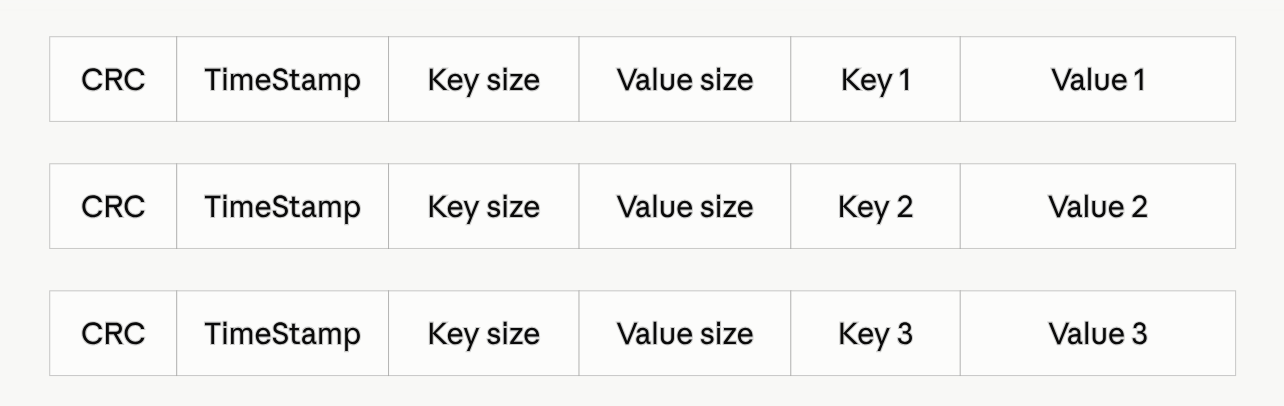
This layout is intentionally simple and fixed-width where possible, so that a reader scanning the file byte-by-byte can always tell exactly how many bytes to consume for the next entry, without needing any external metadata. The timestamp also plays a quiet but important role: because Bitcask never updates data in place, the timestamp is what lets the system determine, among several versions of the same key scattered across different files, which one is the most recent.
3.3Key map in RAM
Using append-only database files causes searches to be slow. Naively, we loop through files and find the entry that has the key with the latest timestamp. However, this causes poor performance, since a single lookup could require scanning every data file the database has ever written.
To tackle this issue, one popular solution is indexing by Key map (KeyMap). KeyMap is a hash table stored in RAM that stores the address value of an entry in Bitcask:
key -> { file_id, value_offset, value_size}
Thanks to the hash map, it is currently possible to search for an entry in a short period of time instead of looping through all database files. In practice this means a get only ever costs a single hash-table lookup followed by, at most, a single disk seek - the theoretical minimum for any disk-backed store that doesn't fit entirely in memory.
The trade-off, of course, is that the entire KeyMap must fit in RAM. Because it only stores keys and small fixed-size metadata (not values), Bitcask can comfortably index datasets where the values are large - think media blobs or logs - even when the total on-disk size is far larger than available memory.
3.4Hint files
One optimization worth mentioning is the use of hint files. Whenever a data file is closed off (i.e., it transitions from active to stable), Bitcask can optionally write a companion hint file that contains just the key and its location - without the value. This means that on startup, Bitcask can rebuild its in-memory KeyMap by scanning the much smaller hint files instead of reading through every full data file, dramatically speeding up recovery time after a restart.
04Operations
With the architecture in mind, we can now walk through exactly what happens under the hood for each of the three supported operations:
Notice how every single mutating operation - including deletes - still boils down to a sequential append. This uniformity is what keeps Bitcask's write path so fast and so easy to reason about: there is exactly one code path for "write something to disk," and it never involves seeking backwards.
05Compaction
The append-only mechanism costs a lot of space in the long term if we do not delete old values and only insert to the end of the active file. Every update to a key leaves the old version sitting in a stable file, taking up disk space it no longer needs to occupy. To tackle this issue, Bitcask uses the compaction mechanism to merge and handle stable files.
Compaction is triggered automatically by Bitcask whenever dead keys reach the threshold (60% by default or 512MB). "Dead" here refers to entries that are either stale (a newer version of the same key exists elsewhere) or tombstoned (the key has since been deleted).
Because compaction reads from old stable files and writes only valid, live entries into a fresh file, the result is a smaller set of files containing only the data that actually matters. This is conceptually similar to garbage collection: dead objects (stale or tombstoned entries) are identified and reclaimed, while live objects are compacted together. Since compaction only ever reads sequentially and writes sequentially, it also avoids the random-IO penalty that motivated Bitcask's design in the first place.
Compaction typically runs as a background process so that it does not block ongoing reads and writes. Because stable files are immutable, the compactor can safely read from them at the same time client requests are being served, without needing heavyweight locking.
06Crash recovery
One of the underrated benefits of an append-only design is how straightforward crash recovery becomes. Because Bitcask never overwrites existing bytes, a crash can, at worst, leave a partially written entry at the very end of the active file - it can never corrupt any previously written entry.
Because corruption can only ever affect the very last, most recently written entry, recovery is bounded and fast - Bitcask never has to worry about corruption "poisoning" an entry deep in the middle of a file, since those bytes are never touched again after being written.
07Pros and cons
7.1Pros
7.2Cons
08Bitcask vs LSM-trees
It's natural to compare Bitcask to LSM-tree (Log-Structured Merge-tree) based engines like LevelDB or RocksDB, since both rely heavily on sequential writes and background compaction. The key difference lies in indexing: Bitcask keeps its entire index in memory as a flat hash map, while LSM-trees keep their index on disk as a layered, sorted structure with only a small portion cached in memory.
In short, Bitcask trades away flexibility (range scans, memory scalability) in exchange for extreme simplicity and the fastest possible point-lookup latency. This is a very reasonable trade-off for workloads like Riak's original use case: mostly key-based access patterns where operational simplicity and predictable tail latency matter more than supporting a rich query language.